The Equipment Checklist That Keeps Adding Things
A screening equipment checklist helps you separate what the event needs from tempting extras, so you can pack lightly and still be ready to show the film.
What does a community film screening actually need, and what is merely one more thing to carry? A screening equipment checklist can answer that by starting with the event you have planned, not a fantasy venue with every possible problem. The aim is a complete, workable kit—not a growing pile of gadgets.
Equipment lists tend to expand by association. A projector suggests a spare projector; a speaker suggests a mixer; a dark room suggests blackout fabric. Some additions solve a real constraint. Others travel from one event to the next because nobody asks what job they do. Separate the essentials from the extras before packing, and the kit becomes easier to manage.
Start with the route from film file to audience
Picture the screening as a chain. The film must reach a playback device, the playback device must send a picture to a display, and sound must reach the audience. Power and a suitable room support that chain. If any link is missing, an accessory elsewhere in the room will not fix it.
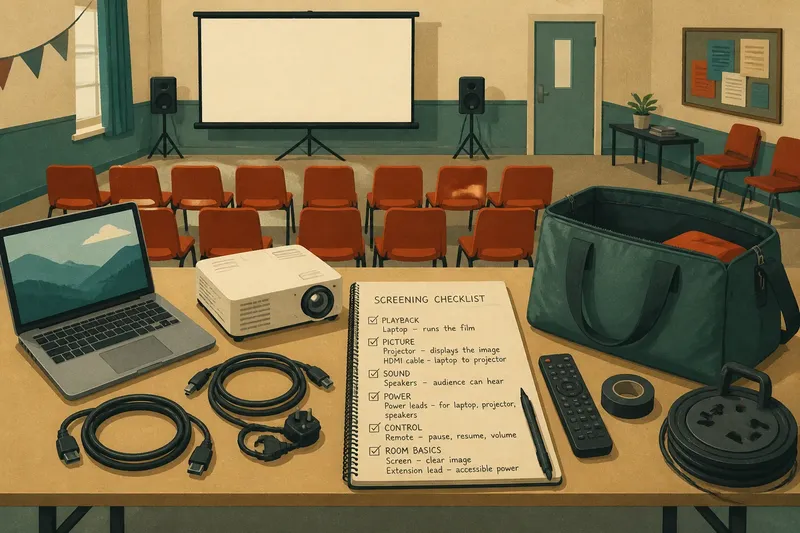
For a simple setup, that might mean a laptop, a projector, the correct video cable, a screen or clear wall, speakers, and the power leads those devices need. The exact equipment changes with the venue: a community hall may supply a screen, while a library meeting room may have a display already fitted. Ask what is available before building a list around assumptions.
Check the playback format as well as the hardware. A film on a laptop may need a compatible file or playback application, and the computer must be able to connect to the chosen display. If the film arrives on a disc or another medium, confirm that the player can read it. The point is not to collect every adapter; it is to identify the specific connection your planned setup requires.
Mark essentials by the job they perform
A useful checklist records a purpose beside each item. “HDMI cable — connects laptop to projector” is more helpful than “cable”, especially when several leads are stored together. This small note also makes it easier to spot duplicates: two cables that perform the same job may be useful as a backup, but a third may add little.
Use the event plan to decide what belongs in the essential kit:
- Playback: the device and medium needed to run the film.
- Picture: the display or projector, plus the matching connection.
- Sound: built-in audio or external speakers, depending on the room and audience.
- Power: the leads and accessible power source required by the selected devices.
- Control: a way to pause, resume or adjust playback without interrupting the screening.
- Room basics: any item the venue does not provide but the plan depends on, such as a screen or suitable extension lead.
“Essential” is not a label for universally indispensable equipment. It means the event cannot work as intended without it. A projector is essential when it is the chosen display; it is unnecessary when the venue’s screen is already connected and ready. Keep the list specific to this screening rather than turning it into a catalogue of everything the group owns.
Keep backups tied to a credible failure
A backup earns its place when it addresses a plausible weak point in the setup. A spare video cable is compact and may help if the main lead is damaged or the connection is uncertain. A second playback device could be sensible if the screening depends on one borrowed laptop and there is no alternative available at the venue. Carrying a second of every item, however, can make setup slower and leave more equipment to track.
Say you are arranging a film in a borrowed room with a projector but have not yet confirmed its input. You ask the caretaker, learn that it accepts HDMI, and bring a laptop with a matching port and one spare HDMI cable. At arrival, you connect the laptop and see the film image appear; the spare stays in the bag. The extra has a clear job without becoming an excuse to pack unrelated adapters.
For each proposed backup, ask what could fail, whether the failure would stop the event, and whether the spare would actually solve it. If the answer is vague, leave the item off for now. A contact number for the venue or a borrowed replacement nearby may be more useful than a bulky duplicate.
Decide whether optional extras earn their space
Optional equipment can improve comfort or presentation, but it should answer a particular need. A small table can keep the laptop stable and out of foot traffic. A remote can make a pause easier to manage from the front of the room. A roll of gaffer tape may help keep a cable from becoming a trip hazard, but it is not a substitute for choosing a safe cable route or following venue guidance.
Other tempting additions are less compelling. A mixer is unnecessary if the playback device connects directly to the speakers and the sound is suitable. A microphone may add little to a small gathering where everyone can hear a spoken welcome. Decorative lights, spare stands and elaborate cable bundles can create more setup work than they remove.
What is not worth the effort is packing equipment “just in case” when nobody can name the problem it would solve. If a concern matters, address it directly: confirm the room’s display, check the connection, or choose a simpler setup. That is often lighter than carrying a kit designed for several hypothetical venues at once.
Which screening equipment questions matter most?
Do I need a projector for a community screening?
Only if the venue does not already have a suitable display that fits the planned audience and room. Check what is installed and available before deciding whether to borrow or bring a projector.
Should I bring a spare cable?
A spare matching cable can be a modest backup when a damaged or unreliable lead would stop the screening. Confirm the connection type first; an assortment of adapters is not useful if none fits the devices.
Are separate speakers always necessary?
No. Some rooms and displays have sound that may suit a small gathering, while others need external speakers. Consider the room, audience and playback device, then choose the simplest audio route that lets people hear comfortably.
How can I keep the kit from growing?
Give every item a job on the checklist and remove anything with no link to the planned setup or a credible backup need. After the event, note what was actually used and what can stay in shared storage.
Make the checklist portable without making it universal
A short reusable checklist can save repeated guesswork, provided it leaves room for venue-specific decisions. Keep a core list for playback, picture, sound and power, then add a small section for the next venue’s confirmed needs. Store leads in labelled pouches and keep the checklist with the equipment, so the person packing can match each item to its purpose.
After a screening, revise the list based on observable details: which connection worked, whether the room’s audio was adequate, and whether an item stayed unused. Do not automatically remove a backup that addressed a real risk, or add a gadget just because it was mentioned during the event. For equipment compatibility, handling and venue rules, follow the relevant manufacturer instructions and local requirements.
The best screening equipment checklist is not the longest one. It is the one that lets another organiser see how the film will play, what the room supplies, and which few items still need to be carried. Keep that distinction clear, and the kit can stay ready without quietly becoming a storage problem.